Create an Alphabetical Tag Page in Eleventy
To make an alphabetical tag page in Eleventy, group the tags by first letter in a custom JavaScript filter that returns an array of letter and tag objects, then loop over it in Nunjucks. Doing the grouping inside a Nunjucks macro failed for me.
- By
- Brennan Kenneth Brown
- Published
- Reading time
- 3 minutes
- Level
- Intermediate
- You need
- An Eleventy site with tagged posts
- Basic Nunjucks
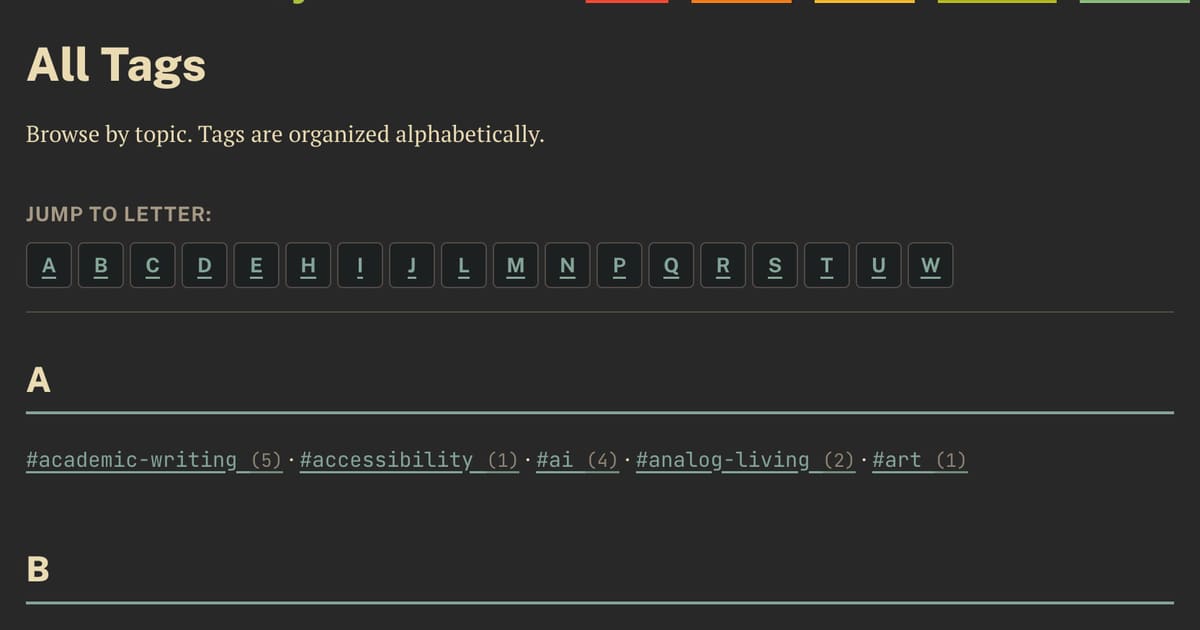
An alphabetical tag page in Eleventy groups tags by first letter and adds a row of links to jump to each letter. My original tags page was a single unordered list of seventy-five tags like #academic-writing, #accessibility, #ai, #blogging and #chronic-illness, which was hard to scan. This guide shows the custom JavaScript filter and template that fixed it, and the Nunjucks problems I hit first. It assumes you already have a tag collection and a tags page based on the Eleventy tag pages docs.
What does the starting tags template look like?
My starting point was a short tags.njk template:
<div class="tag-cloud">
{% for tag in collections.tagList %}
  {% set tagUrl %}/tag/{{ tag | slugify }}/{% endset %}
  {% set postsWithTag = collections.posts | filterByTag(tag) %}
  <a href="{{ tagUrl }}" class="tag-link">#{{ tag }} <span class="tag-count">({{ postsWithTag.length }})</span></a>
{% endfor %}
</div>
My first attempt was a Nunjucks macro to group tags by their first letter:
{% macro groupTagsByLetter(tags) %}
  {% set groupedTags = {} %}
  {% for tag in tags %}
    {% set firstLetter = tag | first | upper %}
    {% if groupedTags[firstLetter] %}
      {% set groupedTags[firstLetter] = groupedTags[firstLetter] + [tag] %}
    {% else %}
      {% set groupedTags[firstLetter] = [tag] %}
    {% endif %}
  {% endfor %}
  {{ groupedTags | sort }}
{% endmacro %}
What went wrong with the Nunjucks macro?
Instead of seeing #academic-writing (5) under the "A" section, there was:
#a (0) · #a (0) · #a (0) · #a (0) · #a (0) · #a (0) · #a (0) · #a (0)#b (0) · #c (0) · #c (0) · #c (0) · #c (0) · #d (0) · #e (0) · #e (0)
Every tag was being split into individual characters, and every count was zero.
How do I check what is in the tag collection?
I first suspected collections.tagList itself, so I added debug output:
<!-- DEBUG: Show first 10 tags from tagList -->
<div style="background: #f0f0f0; padding: 1rem; margin-bottom: 2rem; font-family: monospace;">
  <h3>DEBUG: First 10 tags from collections.tagList:</h3>
  <ul>
    {% set counter = 0 %}
    {% for tag in collections.tagList %}
      {% if counter < 10 %}
        <li>{{ tag }} (first char: "{{ tag | first | upper }}")</li>
        {% set counter = counter + 1 %}
      {% endif %}
    {% endfor %}
  </ul>
  <p>Total tags: {{ collections.tagList.length }}</p>
</div>
The output looked correct:
academic-writing (first char: "A")accessibility (first char: "A")ai (first char: "A")analog-living (first char: "A")art (first char: "A")blogging (first char: "B")
The tagList was fine. The tags were properly normalized (lowercase with hyphens instead of spaces). The first character extraction was working correctly.
Why was every tag count zero?
Next I checked what was in the posts:
<h3>DEBUG: Check first post tags:</h3>
{% if collections.posts.length > 0 %}
  {% set firstPost = collections.posts[0] %}
  <p>First post: {{ firstPost.data.title }}</p>
  <p>Tags: {{ firstPost.data.tags | join(', ') }}</p>
{% endif %}
This revealed the disconnect:
collections.tagListcontained:"academic-writing","accessibility","ai"- Posts contained:
"Creator Economy","Digital Culture","community","indieweb"
The Eleventy config was normalizing tags (lowercase, hyphens instead of spaces) for the tagList collection, but the original posts still had the original tag formats.
My Eleventy config already has a custom filterByTag function that's supposed to handle this normalization:
eleventyConfig.addFilter("filterByTag", function(collection, tag) {
  if(!tag) return collection;
  // Normalize the search tag: convert hyphens back to spaces for matching
  const normalizedSearchTag = tag.toLowerCase().replace(/-/g, ' ');
  return collection.filter(item => {
    return (item.data.tags || []).some(t => {
      // Normalize each tag from the post: convert to lowercase and compare
      const normalizedTag = t.toLowerCase().replace(/^"|"$/g, '');
      return normalizedTag === normalizedSearchTag;
    });
  });
});
The filter should have handled this, but the counts were still zero.
Does Nunjucks split strings into characters?
With tag | first, Nunjucks treated the tag string as an iterable, but the tags were being split into individual characters entirely. Switching from tag | first to tag.substring(0, 1) still had the tags rendered as single characters.
How do I group tags by letter with a JavaScript filter?
I concluded the problem was how Nunjucks handles complex object manipulation in templates, and moved the grouping logic into a custom JavaScript filter in the Eleventy config.
First attempt: return an object
eleventyConfig.addFilter("groupTagsByLetter", function(tags) {
  const grouped = {};
  tags.forEach(tag => {
    const firstLetter = tag.charAt(0).toUpperCase();
    if (!grouped[firstLetter]) {
      grouped[firstLetter] = [];
    }
    grouped[firstLetter].push(tag);
  });
  return grouped;
});
This also failed. My loop over the object's properties in the template never ran:
{% for letter in groupedTags %}
  {% set tags = groupedTags[letter] %}
  ...
{% endfor %}
Second attempt: return an array of objects
Returning an array of { letter, tags } objects worked, because Nunjucks iterates arrays reliably:
eleventyConfig.addFilter("groupTagsByLetter", function(tags) {
  const grouped = {};
  tags.forEach(tag => {
    const firstLetter = tag.charAt(0).toUpperCase();
    if (!grouped[firstLetter]) {
      grouped[firstLetter] = [];
    }
    grouped[firstLetter].push(tag);
  });

  // Convert to array of objects for Nunjucks iteration
  const result = [];
  for (const [letter, tagList] of Object.entries(grouped)) {
    result.push({
      letter: letter,
      tags: tagList.sort()
    });
  }

  // Sort by letter
  return result.sort((a, b) => a.letter.localeCompare(b.letter));
});
What is the final template?
This is the template that worked:
{% set groupedTags = collections.tagList | groupTagsByLetter %}

<nav class="alphabet-nav">
  <p>Jump to letter:</p>
  <div class="alphabet-links">
    {% for group in groupedTags %}
      <a href="#letter-{{ group.letter }}" class="alphabet-link">{{ group.letter }}</a>
    {% endfor %}
  </div>
</nav>

<div class="tags-alphabetical">
  {% for group in groupedTags %}
    <div class="tag-section">
      <h2 class="letter-header" id="letter-{{ group.letter }}">{{ group.letter }}</h2>
      <div class="tag-cloud">
        {% for tag in group.tags %}
          {% set tagUrl %}/tag/{{ tag | slugify }}/{% endset %}
          {% set postsWithTag = collections.posts | filterByTag(tag) %}
          <a href="{{ tagUrl }}" class="tag-link">#{{ tag }} <span class="tag-count">({{ postsWithTag.length }})</span></a>{% if not loop.last %} · {% endif %}
        {% endfor %}
      </div>
    </div>
  {% endfor %}
</div>
What CSS does the alphabetical tag page need?
This CSS styles the letter sections and the sticky jump-to-letter navigation. It uses CSS variables (--panel, --border, --fg, --bg, --accent-primary) from my theme, so replace them with your own values:
/* Tags page alphabetical layout */
.tags-alphabetical {
  margin: 2rem 0;
}

.tag-section {
  margin-bottom: 3rem;
}

.letter-header {
  font-size: 2rem;
  font-weight: 800;
  margin: 0 0 1rem 0;
  padding-bottom: 0.5rem;
  border-bottom: 2px solid var(--accent-primary);
  color: var(--fg);
  scroll-margin-block-start: 12rem;
}

.alphabet-nav {
  position: sticky;
  top: 5rem;
  background: var(--bg);
  padding: 1rem 0;
  margin-bottom: 2rem;
  border-bottom: 1px solid var(--border);
  z-index: 5;
}

.alphabet-link {
  display: inline-flex;
  align-items: center;
  justify-content: center;
  width: 2rem;
  height: 2rem;
  background: var(--panel);
  border: 1px solid var(--border);
  border-radius: 4px;
  color: var(--fg);
  text-decoration: none;
  font-weight: 700;
  transition: all 0.2s ease;
}

.alphabet-link:hover {
  background: var(--accent-primary);
  color: var(--bg);
  transform: translateY(-1px);
}
What should I check when a Nunjucks template misbehaves?
Move complex data manipulation into JavaScript filters. Nunjucks handled object iteration and string manipulation poorly in my templates, while a custom Eleventy filter is easier to read, debug and maintain.
Also check data normalization. My tagList collection held normalized tag names while the posts still held the original forms, and the template had to account for that.
When something goes wrong:
- Verify data sources (what is actually in the collections?)
- Check transformations (are filters working?)
- Simplify templates (remove complex logic)
- Add incremental debug output
My tags page now groups 75 tags into 18 alphabetical sections, with sticky navigation for jumping to a letter, and keeps the existing tag filtering.