Build a Wiki-Linked Digital Garden in Eleventy
An Eleventy digital garden with wiki-links, hover transclusion and footnotes done in CSS only, and a plain-text feed at /urlminder.txt that drives a Beeminder word-count goal.
- By
- Brennan Kenneth Brown
- Published
- Reading time
- 6 minutes
- Level
- Advanced
- You need
- An Eleventy project
- Basic CSS
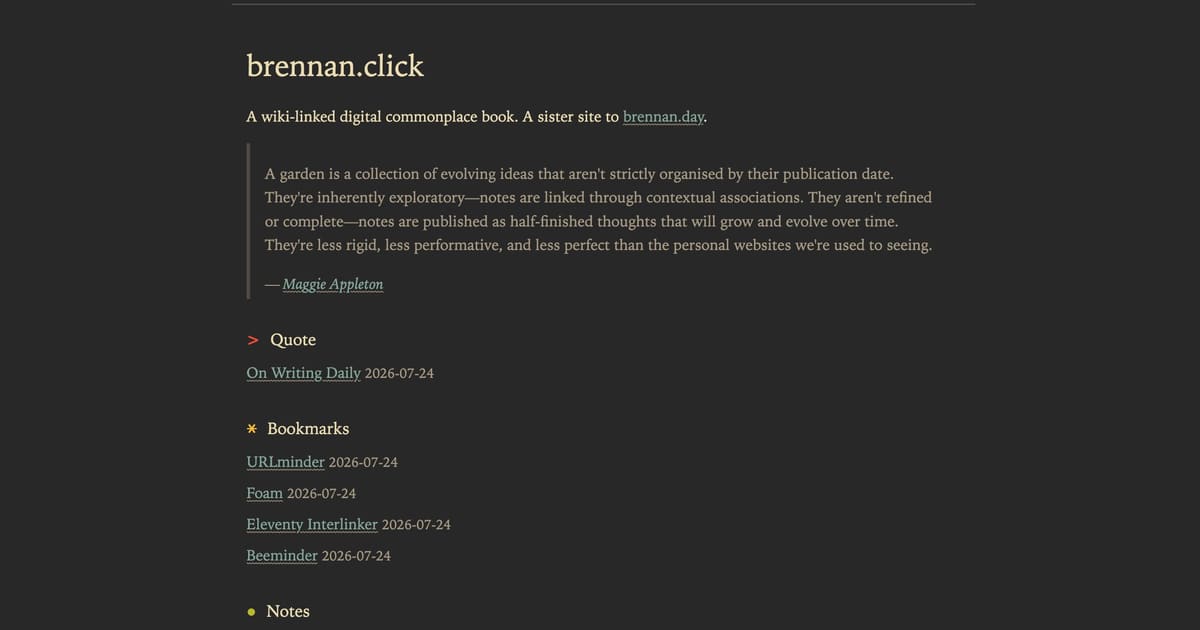
This guide builds a digital garden in Eleventy: one flat folder of markdown notes, [[wiki-links]] that never break, automatic backlinks, hover previews and footnotes done in CSS only, and a plain-text feed that lets Beeminder's URLminder count the words you write each day. I built it as a commonplace book for quotes, bookmarks, diary lines and code snippets that do not belong on my main blog. The repo is at brennanbrown/brennan.click.
How do I track daily word count with a /urlminder.txt feed?
I used to use the wonderful online Markdown editor Draft to track the amount of words I wrote per day on Beeminder on my goal /writing. They shut down and I never found a good alternative.
I actually tried creating my own, a Swift MacBook app called Bearminder, which uses the Bear API to send word count to Beeminder. But I found it too cumbersome to maintain.
This project was a chance to finally use URLminder, which lets Beeminder count the words in any publicly accessible URL. It is typically meant for Google Docs, and raw HTML inflates your word count with every markup tag, but it is accurate with plain-text.
I created an Eleventy template in .11ty.js format to define a route that isn't backed by a markdown file at all, just a render function returning plain text:
export const data = {
  permalink: "urlminder.txt",
  eleventyExcludeFromCollections: true,
};

export function render(data) {
  const notes = (data.collections.notesPublished || []).slice().sort(
    (a, b) => a.date - b.date
  );

  return notes
    .map((note) => {
      const raw = fs.readFileSync(note.inputPath, "utf8");
      const { content } = matter(raw);
      const dateStr = note.date.toISOString().split("T")[0];
      return `## ${note.data.title} (${dateStr})\n\n${content.trim()}\n`;
    })
    .join("\n");
}
It reads every published note's raw markdown straight off disk (stripping frontmatter with gray-matter) rather than the rendered HTML, concatenates them in date order, and serves the result at https://brennan.click/urlminder.txt, which is the URL I pointed my Beeminder goal at.
URLminder-backed goals are Odometer type, meaning the count can only go up. Since notesPublished filters out type: stub entries, and stubs by definition have no content, the feed only grows as I write.
templateFormats: ["md", "njk", "11ty.js", "txt"] in .eleventy.js is what makes Eleventy recognize .11ty.js templates and output a .txt file. The snippet above also needs fs and gray-matter imported at the top of urlminder.11ty.js.
What features does the garden need?
These were the requirements:
- Flat namespace of notes, one markdown file per entry, filename = slug = title.
- [[double-bracket]] wiki-links that resolve automatically (and never break, as missing targets will generate stub pages rather than a dead link.)
- Backlinks on every page, automatically generated.
- Transclusion: Hover-to-preview excerpts on outgoing links, and hover-to-reveal footnotes, both with CSS and not JavaScript
- Brutalist design: one column, no breakpoints, Modern Font Stacks for type, Gruvbox for colour.
- A dedicated /urlminder.txt route that dumps the plain-text markdown source of every published note, so Beeminder's URLminder can count words written and drive an Odometer goal.
- AGPL-3.0-or-later for the code, CC BY-SA for the writing like all my other projects.
How is the project structured?
src/
  notes/          # everything published, flat, one file per entry
  inbox/          # daily freewrite dump, excluded from the build
  _data/          # symbols.js (symbol taxonomy)
  _includes/      # layouts, partials
  assets/css/     # design system
  urlminder.11ty.js
The project has one flat src/notes/ directory, rather than category subfolders. Wiki-links need to resolve to exactly one file by slug, so category lives in a type frontmatter field instead of a folder path:
---
title:              # optional, overrides the filename-derived title
type: note          # note | quote | bookmark | diary | snippet | stub
symbol: ●           # single Unicode character
date: 2026-07-24
tags: [gruvbox, css]
source_url:         # for quote / bookmark entries
---
type doubles as an 11ty collection, so I loop over type_note, type_quote, etc. on the homepage without any extra bookkeeping.
How do I add wiki-links in Eleventy?
A digital garden depends on low-friction cross-referencing, so I used @photogabble/eleventy-plugin-interlinker for this. With it, writing [[science]] anywhere in a note links to /science/, whether or not notes/science.md exists yet.
The plugin exposes a resolvingFns map, so you can override how a resolved (or unresolved) link renders. I use it for two things:
- Rendering a distinct style for broken links.
- For links that do resolve, attaching a build-time excerpt of the target note for the hover preview (covered below):
eleventyConfig.addPlugin(EleventyInterlinkerPlugin, {
  defaultLayout: "layouts/stub.njk",
  deadLinkReport: "json",
  resolvingFns: new Map([
    [
      "default",
      async (link) => {
        const title = link.title || link.name;
        if (!link.exists || !link.page) {
          return `<span class="wikilink-wrapper"><a class="wikilink wikilink--broken" href="/${slugify(link.name)}/">${title}</a></span>`;
        }
        const excerpt = excerptFromFile(link.page.inputPath);
        const preview = excerpt
          ? `<span class="wikilink-preview" aria-hidden="true">${excerpt}</span>`
          : "";
        return `<span class="wikilink-wrapper"><a class="wikilink" href="${link.href}">${title}</a>${preview}</span>`;
      },
    ],
  ]),
});
If I have a note that has [[a link]] to a page that doesn't exist, deadLinkReport: "json" writes it to .dead-links.json after building. Then, a script slugifies each broken link name, and creates a minimal type: stub file for any that doesn't already exist in src/notes/:
const slugs = new Set(Object.keys(raw).map(extractSlug).filter(Boolean));

for (const slug of slugs) {
  const filePath = path.join(notesDir, `${slug}.md`);
  if (fs.existsSync(filePath)) continue;
  fs.writeFileSync(filePath, `---\ntype: stub\nsymbol:\ndate: ${today}\n---\n`, "utf8");
}
Since a fresh build's link doesn't resolve until the stub file exists on disk, the npm run build script has to run Eleventy twice, generating stubs in between:
"build": "eleventy && npm run stubs && eleventy"First pass builds the site and writes .dead-links.json. The stub script turns that report into real (if empty) files. Second pass builds again, and now every wikilink resolves to something. Stubs are also flagged as content debt to be filled in later.
How do I generate backlinks?
Backlinks come from the interlinker plugin as a backlinks template variable. Forward links (what a note itself links out to) are obtained by regex-matching the plugin's own wikilink CSS class back out of the rendered HTML, as the plugin doesn't expose that list directly:
eleventyConfig.addFilter("forwardLinks", (content) => {
  const matches = [
    ...(content || "").matchAll(/<a class="wikilink[^"]*" href="([^"]+)">([^<]*)<\/a>/g),
  ];
  return matches.map(([, href, text]) => ({ url: href, title: text }));
});
Both lists render at the bottom of layouts/note.njk as a "Links to" / "Linked from" pair.
How do I show previews and footnotes on hover without JavaScript?
I wanted hovering over a wiki-link to reveal a snippet of the page it points to, the kind of transclusion preview Obsidian popularized, but without any client-side JavaScript.
AetherAnne wrote a tutorial for displaying footnotes without JS, using the CSS next-sibling combinator: putting the reveal content in a hidden sibling element right after the trigger, then flipping its display on :hover. The same approach works for transclusion:
.wikilink-wrapper {
  position: relative;
  display: inline-block;
}

.wikilink-preview {
  display: none;
  position: absolute;
  bottom: 100%;
  left: 0;
  max-width: 30ch;
  padding: 0.5rem 0.75rem;
  background: var(--panel);
  border: 1px solid var(--border);
}

.wikilink-wrapper:hover .wikilink-preview,
.wikilink-wrapper:focus-within .wikilink-preview {
  display: block;
}
:focus-within alongside :hover means keyboard users tabbing through links also get the preview, not just mouse users.
The preview text itself is generated at build time, not scraped from the DOM. Each resolved wikilink reads its target file straight off disk, strips markdown syntax and wikilinks down to plain words, and takes the first forty:
function excerptFromFile(inputPath, wordLimit = 40) {
  const raw = fs.readFileSync(inputPath, "utf8");
  const { content } = matter(raw);
  const plain = toPlainText(
    content
      .replace(/^#{1,6}\s+/gm, "")
      .replace(/[*_`]/g, "")
      .replace(/\[\[([^\]|]+)(\|([^\]]+))?\]\]/g, (_, name, __, alias) => alias || name)
  );
  const words = plain.split(/\s+/).filter(Boolean);
  return words.slice(0, wordLimit).join(" ") + (words.length > wordLimit ? "…" : "");
}
Footnotes use the same hover pattern, but require an extra step. markdown-it-footnote renders each footnote's body at the end of the token stream, in a footnote_tail block, disconnected from the inline footnote_ref marker that triggers it. There's no built-in way to grab a footnote's own text from the ref that points to it.
Get the finalized token stream once per document, right after footnote_tail runs, and cache each footnote body by id:
md.core.ruler.after("footnote_tail", "extract_footnote_contents", (state) => {
  const contents = {};
  let currentId = null;
  let buffer = [];
  for (const token of state.tokens) {
    if (token.type === "footnote_open") {
      currentId = token.meta.id;
      buffer = [];
      continue;
    }
    if (token.type === "footnote_close") {
      contents[currentId] = md.renderer.render(buffer, md.options, state.env);
      currentId = null;
      continue;
    }
    if (currentId !== null && token.type !== "footnote_anchor") {
      buffer.push(token);
    }
  }
  state.env.footnoteContents = contents;
});
Then I override the ref renderer to look up that cached content and wrap the superscript in a hidden sibling span, which is AetherAnne's pattern, wired through markdown-it instead of hand-written HTML:
md.renderer.rules.footnote_ref = (tokens, idx, options, env, self) => {
  const original = defaultFootnoteRefRender(tokens, idx, options, env, self);
  const id = tokens[idx].meta.id;
  const text = (env.footnoteContents && env.footnoteContents[id]) || "";
  const hidden = `<span class="fn-content" aria-hidden="true">${text}</span>`;
  return `<span class="fn-wrapper">${original}${hidden}</span>`;
};
aria-hidden="true" on the hidden span keeps screen reader users from sitting through the footnote inline; they still get the normal jump-to-bottom-of-page link the superscript already provides.
What does the CSS look like?
I use no CSS framework or preprocessor. src/assets/css/style.css is under 320 lines, and the layout is one centered column, max-width: 50em to eliminate the need for media queries. Fonts come from Modern Font Stacks for the fonts:
h1, h2, h3, h4, h5, h6 {
  font-family: 'Iowan Old Style', 'Palatino Linotype', 'URW Palladio L', P052, serif;
}

body {
  font-family: ui-monospace, 'Cascadia Code', 'Source Code Pro', Menlo, Consolas,
    'DejaVu Sans Mono', monospace;
}

/* Gruvbox Palette */

:root {
  --bg: #fbf1c7;
  --fg: #3c3836;
  --link: #076678;
}

@media (prefers-color-scheme: dark) {
  :root {
    --bg: #282828;
    --fg: #ebdbb2;
    --link: #83a598;
  }
}
How do I mark note types with Unicode symbols?
Unicode symbols are a light alternative to SVG icon sets (see Add Personality to a Website with CSS Variables and Unicode Symbols), and they suit this project.
Each note type (note, quote, bookmark, diary, snippet, stub) gets an accent colour and Unicode symbol, defined once in src/_data/symbols.js. The specific symbols are provisional until I have used the garden for a while.
| type | symbol | rationale |
|---|---|---|
| quote | > | classic quote symbol |
| bookmark | ⚹ | reads as starred |
| note | ● | generic filled circle |
| diary | 🜁 | air symbol |
| snippet | 🜃 | earth symbol |
| stub | ☉ | empty circle, nothing here yet |
export default {
  quote: { symbol: ">", class: "sym--quote", label: "quote" },
  bookmark: { symbol: "⚹", class: "sym--bookmark", label: "bookmark" },
  note: { symbol: "●", class: "sym--note", label: "note" },
  diary: { symbol: "🜁", class: "sym--diary", label: "diary" },
  snippet: { symbol: "🜃", class: "sym--snippet", label: "code snippet" },
  stub: { symbol: "☉", class: "sym--stub", label: "stub" },
};
How do I keep the daily habit going with an inbox?
To make daily writing easy, I added a GTD-style brain-dump inbox. The daily minimum version of "adding content" is just opening src/inbox/ (excluded from the build via .eleventyignore) and dumping a thought, no frontmatter, no formatting, then committing. That keeps the Beeminder goal alive on busy days.
Later I go through the inbox fragments, classify what type each is and assign a symbol from the taxonomy table, write out proper frontmatter and a slug, add [[wikilinks]] to anything that already exists as a note, and create a new file for it at src/notes/<slug>.md, then clear it out of the inbox.
Known limitations
The double build (eleventy && npm run stubs && eleventy) is a little inelegant, and every build is slower as a result. A single-pass version would need the interlinker plugin to accept a "create the file for me" resolving function rather than just reporting dead links, which isn't something the plugin exposes. This isn't going to be a big deal until the site gets large, and at that point I might write a custom plugin for this.