Make Your Website Work Without JavaScript
Many sites look broken or empty without JavaScript. A `.no-js` class, a few CSS rules and a noscript message keep a page usable, and the Lynx text browser makes a quick test.
- By
- Brennan Kenneth Brown
- Published
- Reading time
- 3 minutes
- Level
- Beginner
- You need
- A website you can edit
- Basic HTML and CSS
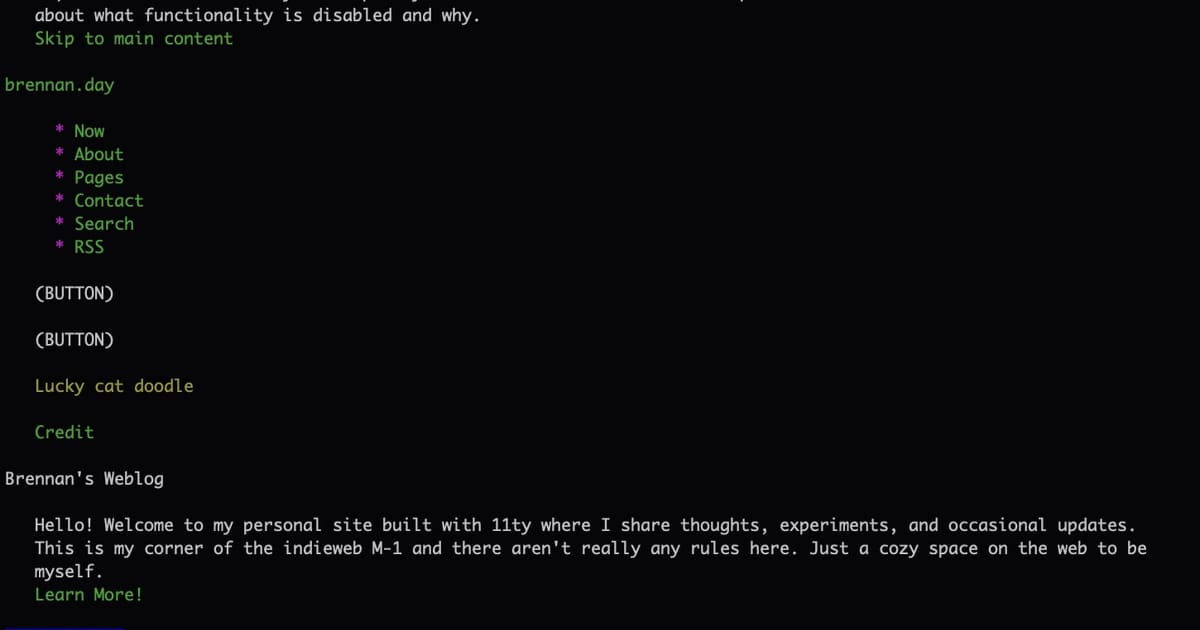
To make a website work without JavaScript, add a no-js class to the root element, remove it with the first script that runs, hide script-dependent features with CSS when the class remains, and explain what is missing in a <noscript> message. Many sites assume a recent device and browser with JavaScript enabled, which leaves out people who block scripts, use terminal browsers, or have older hardware. I went through my own site to make it degrade properly, and this guide shows the approach and how to test it in the Lynx text browser.
Why make a website work without JavaScript?
Many sites are built with heavy frameworks like React or Vue and require JavaScript for everything. Some users disable JavaScript for these reasons:
- Privacy-conscious users who block all scripts by default
- People on slow connections or who are using older technology where JavaScript lags the experience or might not even be an option
- Certain users of assistive technology
- Terminal browser users
- People simply trying to conserve battery on mobile
Supporting these users also makes the site more robust for everyone.
What breaks on a site without JavaScript?
These features on my site depended on JavaScript:
- The comment system (IndieAuth authentication, form submission)
- Status.lol widget in the sidebar
- Theme toggle for dark/light mode
- Search functionality (Pagefind)
- Newsletter signup form
- Post graph visualization
- Various other interactive elements (tooltips, easter eggs, etc.)
With JavaScript off, visitors got no explanation or alternative, and parts of the page showed as empty spaces.
How do I add a no-js class with progressive enhancement?
Start with a no-js class on the root element and let JavaScript remove it. This is a form of progressive enhancement, which differs from graceful degradation.
<!DOCTYPE html>
<html lang="en" class="no-js">
Then add this as the first script in the <head>, so it runs before the page renders:
// Remove no-js class immediately when JS is enabled
document.documentElement.classList.remove('no-js');
This creates two states automatically:
- With JavaScript:
.no-jsis removed, everything works normally - Without JavaScript:
.no-jsstays, and you can style accordingly
How do I hide features that need JavaScript?
With the .no-js class in place, hide JavaScript-dependent features:
/* Hide JavaScript-dependent features when JS is disabled */
.no-js .js-required {
  display: none !important;
}

.no-js #theme-toggle {
  display: none !important;
}

.no-js .comments-section {
  display: none !important;
}

.no-js #status-lol-container {
  display: none !important;
}
Also explain what is missing, using a CSS message:
.no-js .status-container::after {
  content: "Status updates require JavaScript to be enabled.";
  font-style: italic;
  color: var(--muted);
  display: block;
  padding: 1rem;
  text-align: center;
}
How do I write a noscript message?
I added a <noscript> message at the top of the page:
<noscript>
  <p>🌻 Welcome to brennan.day! I respect your decision to not use JavaScript. You can read <a href="/no-js/">here</a> for more information about what functionality is disabled and why.</p>
</noscript>
Most sites tell the visitor they must enable JavaScript. A better message says that some features need it. The most useful one accepts the choice and explains what is missing and what the alternatives are. The link in my noscript message goes to /no-js/, a dedicated page explaining:
- What works without JavaScript (all content, navigation, RSS, etc.)
- What requires JavaScript and why
- Alternatives for each feature
- My commitment to accessibility
How do I test a site without JavaScript in Lynx?
Test in an environment where JavaScript doesn't exist. Lynx is a text-based web browser that's perfect for this.
# Install Lynx (if you don't have it)
brew install lynx

# View your site
lynx http://localhost:8080
In Lynx, the noscript message appeared at the top. The status section showed empty (as expected). The search page had no search interface. All the content and links worked, though a couple of rendering issues remain. Browser dev tools can also disable JavaScript for a quick check.
What does the complete implementation look like?
The complete approach in one place:
1. HTML Structure
<html lang="en" class="no-js">
<head>
  <script>
    // Remove no-js class immediately
    document.documentElement.classList.remove('no-js');
  </script>
</head>
<body>
  <noscript>
    <p>🌻 Welcome! I respect your decision to not use JavaScript.
       <a href="/no-js/">Learn more</a> about what's disabled.</p>
  </noscript>

  <!-- Your content here -->
</body>
</html>
2. CSS Rules
/* Hide JS-dependent elements */
.no-js .js-required,
.no-js #theme-toggle,
.no-js .comments-section,
.no-js .post-graph {
  display: none !important;
}

/* Show helpful messages */
.no-js .status-container::after {
  content: "Status updates require JavaScript.";
  font-style: italic;
  color: var(--muted);
}

/* Style the noscript message */
noscript {
  display: block;
  background: var(--panel);
  border: 1px solid var(--accent-primary);
  padding: 1rem;
  margin: 1rem 0;
  text-align: center;
  border-radius: 4px;
}
3. Mark Interactive Elements
Add js-required class to elements that need JavaScript:
<button class="theme-toggle js-required">Toggle theme</button>
<div class="post-graph js-required">...</div>
What did I learn?
Progressive enhancement is always kinder than graceful degradation. Start with a working baseline, then enhance.
Don't only hide features. Explain what is missing and why.
Test in real environments, including a terminal browser.
The CSS-based approach is simple to implement and maintain. For related fixes, see the web accessibility checklist and Improve Your Lighthouse Score.
Resources
- A List Apart: Progressive Enhancement
- MDN: Progressive enhancement
- Lynx browser for testing (or using!)